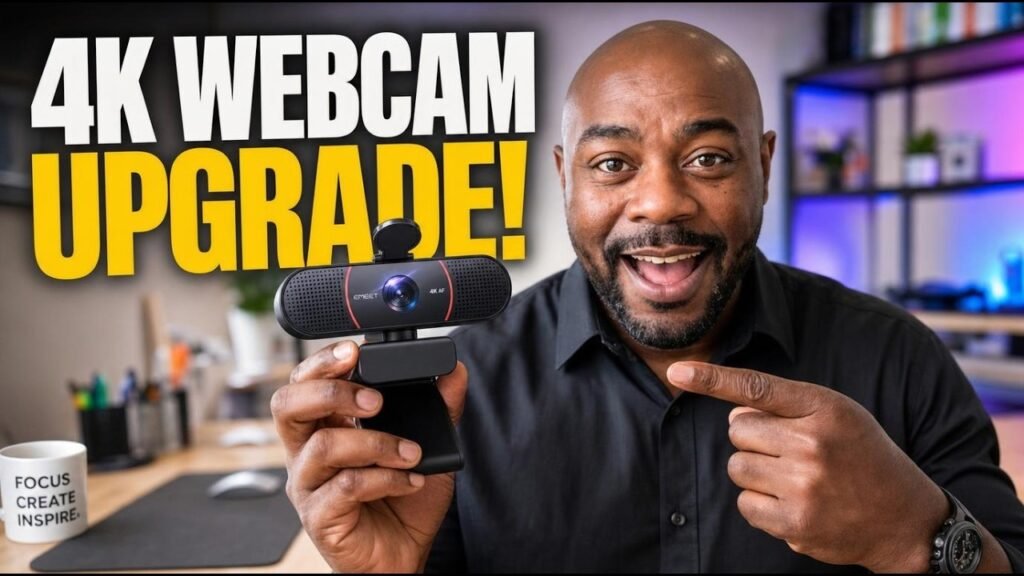
I'd been getting by on my laptop's built-in camera for a while. It was decent — it got the job done. But "decent" and "good" aren't the same thing, and once you're making videos regularly, you notice the gap every time you look at yourself on screen. I wanted better quality without dropping hundreds on a camera rig. This EMEET C960 review is my hands-on answer to that itch: I picked one up, unboxed it, hooked it up, and put it through its paces.
Quick answers
Is the EMEET C960 easy to set up?
Yes. It's USB-A plug and play — plug it in, power it on, and your computer picks it up with no drivers or software required. My only hiccup was my own complicated recording setup capturing horizontal and vertical at the same time; the camera itself was straightforward.
How good is the autofocus?
The standout feature in my test. I held up a product box with text, moved it toward the camera, and the autofocus kicked right in with the words clear and readable. For product demos, streaming, and video calls, that's exactly the test a webcam has to pass.
Should you run it at 4K or 1080p?
I ran 1080p and it looked good — most platforms don't really play 4K yet, so don't feel like you're missing out. The 4K capability is there for when they catch up. Plan on pairing it with an external mic; I tested with mine and said so in the video.
Check it here: EMEET C960 4K Webcam
What the EMEET C960 is
It's a standalone USB webcam rated for 4K video, and the whole selling point is that it's a plug-and-play upgrade over the camera baked into your laptop or monitor. Out of the box you've got the camera itself, a USB-A connection, and a privacy cover for the lens that snaps on so the camera can't be peeking when you don't want it to be.
Two features sold me before I even powered it on. First: USB-A plug and play — plug it right in, power it on, it goes. No driver downloads, no setup ritual. Second: a standard tripod thread, so you can mount it on a tripod instead of being stuck wherever your monitor sits. That second one matters more than you'd think.
What I actually did with it
I unboxed it on camera, plugged it into my computer, and ran it for real — recorded with it, moved products in front of it, checked the focus and the background. Here's what I found:
Setup was genuinely easy. Plugged it in, settings came up, and I was going. The only hiccup was my own doing — I was running it through a third-party recording setup capturing horizontal and vertical at the same time. My software, not the camera. Once I got past my own complication, the camera itself was straightforward.
The autofocus is the real standout. I tested it the way that matters for content creators: I held up a product box with text on it, moved it toward the camera, and watched what happened. The autofocus kicked right in and the words came in clear and readable. That's the test a webcam has to pass for product demos, and it passed.
The background stays sharp. My background scenery — the room behind me — came through crisp instead of the mushy blur you get from a lot of laptop cameras. If you film at your desk and your backdrop matters, that's a meaningful step up.
I ran it at 1080p and it looked good. The camera is rated for 4K, but here's my practical take: not that many places actually play 4K yet. I set it to 1080 and the quality was genuinely good. The 4K capability is there for when the platforms catch up, but don't feel like you're missing out running 1080.
Tripod mounting changed the framing. Sitting on top of my laptop, the camera was just too close to my face. I put it on a little mini tripod at the edge of my desk, and suddenly I could fit myself in the frame comfortably. That flexibility is the whole point of the tripod thread, and it's a real upgrade over a fixed laptop camera.
Audio is on you. I had my external mic hooked up for this test — and if you watch the video, you'll hear me say I'm doing a separate mic video the next day, because the audio chain matters as much as the image. Plan on pairing this with a decent mic, like I did.
Who this EMEET C960 review is for
This is for anyone working off a laptop camera who's ready for a visible step up: remote workers on video calls all day, streamers, YouTubers, online teachers. If you want better clarity and real autofocus without spending hundreds of dollars, this is squarely in that lane.
Who should skip it? If you're happy with your laptop camera and you only get on video occasionally, you don't need new hardware. And if you're already running a proper mirrorless or DSLR as a webcam, you've outgrown this — this is an upgrade from a laptop camera, not from a pro rig.
Buyer questions, answered
Do I need to install anything?
No. It's USB-A plug and play — plug it in, power it on, and your computer picks it up. No drivers, no software required.
Does it work with a tripod?
Yes, it has a standard tripod thread. I mounted mine on a small desktop tripod and it made framing way easier — I'd recommend it over balancing it on your monitor.
Is there a privacy cover?
Yes. It comes with a cover that snaps over the lens, so you can physically block the camera when you're not using it.
Is the autofocus actually good?
In my test it was. Holding up a product with text, the autofocus locked in quickly and the words were readable. For calls, streaming, and product demos, that's exactly what you want.
Should I run it at 4K or 1080p?
I ran 1080p and it looked good. 4K is there if you want the headroom, but since most platforms don't really play 4K yet, 1080 is a perfectly fine daily setting.
Will it replace my laptop camera for work calls?
That's the use case it's built for. Sharper image, real autofocus, flexible placement — it's a clear step up from any built-in laptop camera I've used.
The bottom line
I bought the EMEET C960 because I wanted better quality than my laptop camera without spending hundreds of dollars, and that's exactly what I got. Plug-and-play setup, autofocus that locks onto what you hold up, a sharp background, and tripod mounting that fixed my framing in one move. Thumbs up — a solid upgrade.
EMEET C960 4K Webcam
As an Amazon Associate I earn from qualifying purchases.
Pingback: ZealSound USB Microphone Review: K66 Noise Test
Pingback: Hayner Seek XY920 Review: Wired Monitoring, Zero Headaches
Pingback: 60 LED Video Light Review: Bright Enough to Film?
Pingback: USB C to USB A Adapter Review: End Cable Mismatch